How to Replace a Physical Construction Calculator with an iPhone app.
Replacing a handheld construction calculator is less about copying one keypad and more about keeping
the whole workflow in one place: feet-inch-fractions, tool-specific calculators, conversion, saved
history, and quick support. Construction Pro is built around that broader jobsite workflow on iPhone.
By Construction Pro TeamLast updated March 29, 2026
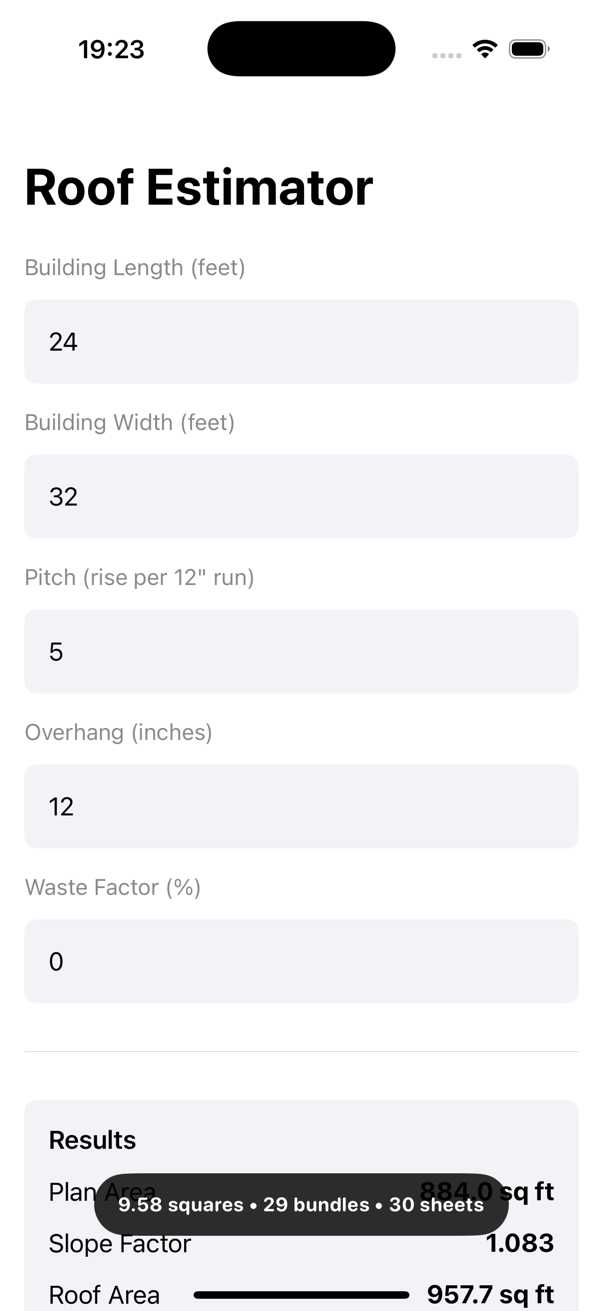
App Screenshot
All-in-one app workflow screen
This screenshot comes from the roofer takeoff recording used for this Construction Pro workflow article.
Recorded iPhone workflow showing how Construction Pro replaces separate field-calculation tools.
Quick answer
Roofing use: enter length, width, pitch, and overhang in one phone workflow.
Framing use: switch between stair and rafter tools without leaving the app.
Estimator use: keep concrete, drywall, right-angle, and help screens on the same device.
Field Use
Why crews move away from a separate handheld device
Phones are already in a pocket on most job sites. If one app can cover dimensional math,
takeoff, saved job history, and quick reference material, it reduces tool switching and makes
example-driven support much easier to reach in the moment.
Use it when you need several construction calculators in one day instead of one isolated function.
Use it when you want help content and calculation tools together.
Use it when saved history matters as much as the current answer.
Worked Examples
Three ways the workflow changes
These examples come directly from the current tutorial plan for Construction Pro.
Example 1
Roofer on a takeoff walk
Task: enter roof length, width, pitch, and overhang in the app.
Instead of carrying a separate roofing calculator and a phone, the roofer enters the job
dimensions directly in Construction Pro. The app returns squares,
bundles, sheathing sheets, and rafter length
in the same roof workflow.
Example 2
Carpenter laying out stairs and rafters
Task: switch between the stair and rafter tools during framing.
Construction Pro keeps both workflows under Tools, so the carpenter can move
from stair rise and total run to common-rafter length and cut angles without juggling devices or
handwritten references.
Example 3
Remodel estimator in the field
Task: use concrete, drywall, right-angle, and help screens from the same device.
On a remodel walkthrough, one person can check slab patch volume, drywall count, diagonal
layout, and tutorial guidance from the same phone. That is the practical advantage over a
single-purpose physical calculator that cannot keep saved history or support content nearby.
What changes in practice
Benefits that matter more than novelty
One app can cover several trades instead of one specialty keypad.
Saved history makes it easier to revisit a prior calculation on the same job.
Support articles and worked examples stay one tap away when someone forgets the workflow.